How to check if ChatGPT and other AI assistants recommend your business
To check whether ChatGPT recommends your business, ask ChatGPT, Gemini, Copilot and Google AI Mode the 5 to 10 questions your customers would ask, in a private window and signed out where possible, with your town in each question, and note whether your business is named, where, and which other businesses are named. Repeat the check on another day, because the same question can get a different list of names on another day.

In short
- Write the questions the way a new customer would ask them, not with your business name in them.
- Use a private or logged-out window, because a logged-in account can personalize the answer.
- Put the town or region into the question; several assistants otherwise answer without knowing where you are.
- Note four things per answer: whether you are named, your position if listed, which other businesses are named and which websites are cited.
- One round is a snapshot. Repeat the same questions on another day before drawing conclusions.
On this page
To find out whether ChatGPT and other AI assistants recommend your business, ask them the questions your customers ask, the way a stranger would: in a private window, with your town in the question, and without your business name. Then write down whether you were named, your position if listed, which other businesses were named and which websites the answer cited. Do it again on another day, because the answers change.
This guide shows the manual method step by step, with an example table you can copy. Further down, it explains what makes the manual check slow and how CheckAI runs the same method for you.
The short version
A useful check has three parts. You ask several realistic questions, not one. You ask several assistants, because they often give different answers. And you repeat the round, because a single answer is one sample, not a verdict.
What you are looking for is not whether the assistant "knows" you. It is whether your business comes up when someone who doesn't know it yet asks for what you offer.
How to check by hand, step by step
- Write 5 to 10 customer questions. Phrase them the way a new customer would, in full sentences. Cover different needs: a general request ("Which bakery in Zürich would you recommend for sourdough bread?"), a price question, a trust question ("Which bakery in Zürich has good reviews?"), an urgent one ("Which bakery in Zürich opens early tomorrow?") and a specific use ("Where can I order a birthday cake for 20 people in Zürich?"). Leave your business name out.
- Put the place into the question. Write the town, district or region into every question that depends on location. Without a place in the question, an assistant may assume the wrong location, so "a bakery near me" can produce answers for the wrong country.
- Use a private or logged-out window. Where the assistant allows it, ask without being logged in. Depending on the assistant and its settings, a logged-in account may use your history or earlier chats to shape the answer, and you may already have asked about your own business many times.
- Ask each assistant the same questions. Use ChatGPT, Google AI Mode, Gemini and Microsoft Copilot. Google AI Mode is a separate chat-style mode in Google Search; it is not the same as the AI Overview that sometimes appears above normal results, so note which one you used. Start a new chat for each question where chats are available, so one answer doesn't shape the next. How the four assistants differ is covered in ChatGPT, Gemini, Copilot and Google AI Mode compared.
- Note four things per answer. Were you named? If so, were you in a list, and where? Who else was named? Which websites did the answer link to as sources?
- Read the sentence around your name. A mention can be a recommendation, a neutral entry in a list, or a remark such as "closed on Sundays". Copy the sentence into your notes.
- Repeat on another day. Ask the exact same questions again a few days later. Change nothing in the wording, so differences in wording do not affect your comparison.
- Keep everything in one table. Use one row per question and assistant, with a column for each detail you noted and one for the date. After a few rounds the table shows a pattern that a single answer can't.
An example table for a bakery in Zürich
| Question | Assistant | Named? | Position | Also named | Sources cited |
|---|---|---|---|---|---|
| Which bakery in Zürich would you recommend for sourdough bread? | ChatGPT | Yes | 3 | Bakery A, Bakery B | a city guide, a review site |
| Which bakery in Zürich would you recommend for sourdough bread? | Gemini | No | Bakery A, Bakery C, Bakery D | none shown | |
| Where can I order a birthday cake in Zürich Kreis 4 for Saturday? | Copilot | No | Bakery B, a supermarket chain | a directory listing | |
| Which bakeries in Zürich have good gluten-free options? | Google AI Mode | Yes | 1 | Bakery E | a forum thread, your own site |
For a worked example with real answers, see the test of which bakeries ChatGPT recommends in Phoenix. Two columns tend to be the most useful later. "Also named" shows which other businesses appear alongside yours, including businesses you might not expect. "Sources cited" shows which websites the assistant cited, so you can check whether those sites list your business correctly.
What it means when ChatGPT names, or skips, your business
Named is not the same as recommended
"Named" means the answer mentions your business. You can count those mentions. Whether the mention is a recommendation depends on the wording around it, so read the sentence before you celebrate or worry. A business named as "another option, though reviews are mixed" counts as named.
Position matters, within limits
Assistants often list several businesses. Being first in the list is more visible than being fifth, but the order can change from one answer to the next. Treat position as a rough signal: "usually near the top" or "usually at the end of a long list", not a precise rank.
Our data In the checks run on CheckAI so far, when the checked business was named at all, its median position was 2.5, and it was listed first in 19% of the 36 answers that named it.
One snapshot versus a trend
A single round shows what the assistants said in that check, with a lot of uncertainty. Asking the same question twice can give a different set of names, so a change from "named" to "not named" between two days may be normal variation. You need several rounds with identical questions to look for a trend.
Our data When the same question for the same business went to the same assistant again in a later check, the list of named businesses was identical in 0 of 42 pairs. The overlap score between the two lists averaged 0.24 (0 means no shared names, 1 means the same list). The simple yes or no for the checked business stayed the same in 38 of 42 pairs, mostly because it was "not named" both times.
- 5.1%of 709 answers named the checked business
- 18 of 31checks with no answers naming the business
- 17distinct business names per question across four assistants (median)
If your first round shows few or no mentions, you are not unusual in this sample. The guide on why AI assistants don't mention your business lists what to look at next.
What makes the manual check hard
The method is simple. Doing it properly by hand takes longer than most owners expect, for four reasons.
The number of answers adds up
Six questions asked to four assistants means up to 24 answers per round. Each question needs a separate chat or search, and each answer needs a row in your table. Repeat that every week or two and it becomes a regular task, not a quick look.
The answers are long
Our data Median answer length ranged from about 350 words (ChatGPT and Gemini) to 440 (Copilot), and an answer named about 4.5 to 6 businesses on average, depending on the assistant. Finding your name, its position and every other business in 24 such answers is slow and easy to get wrong when names are spelled differently or appear only as a website address.
Answers vary
Because the list of names can change between checks (see why ChatGPT's answers can change), you need several rounds before you can tell a real change from noise. By hand, that means keeping the wording identical and the records consistent over weeks.
Location is easy to get wrong
If you are logged in, or if your browser shares your location, your results may not match what a new customer elsewhere sees. If you forget the place in a question, the answer may describe businesses in another country.
How CheckAI runs the same check on all four assistants
CheckAI follows the method above and does the repetitive parts. You enter your website; it reads the homepage and drafts 6 customer questions, which you can edit before anything is asked. The place goes into each question to make the location clear across assistants.
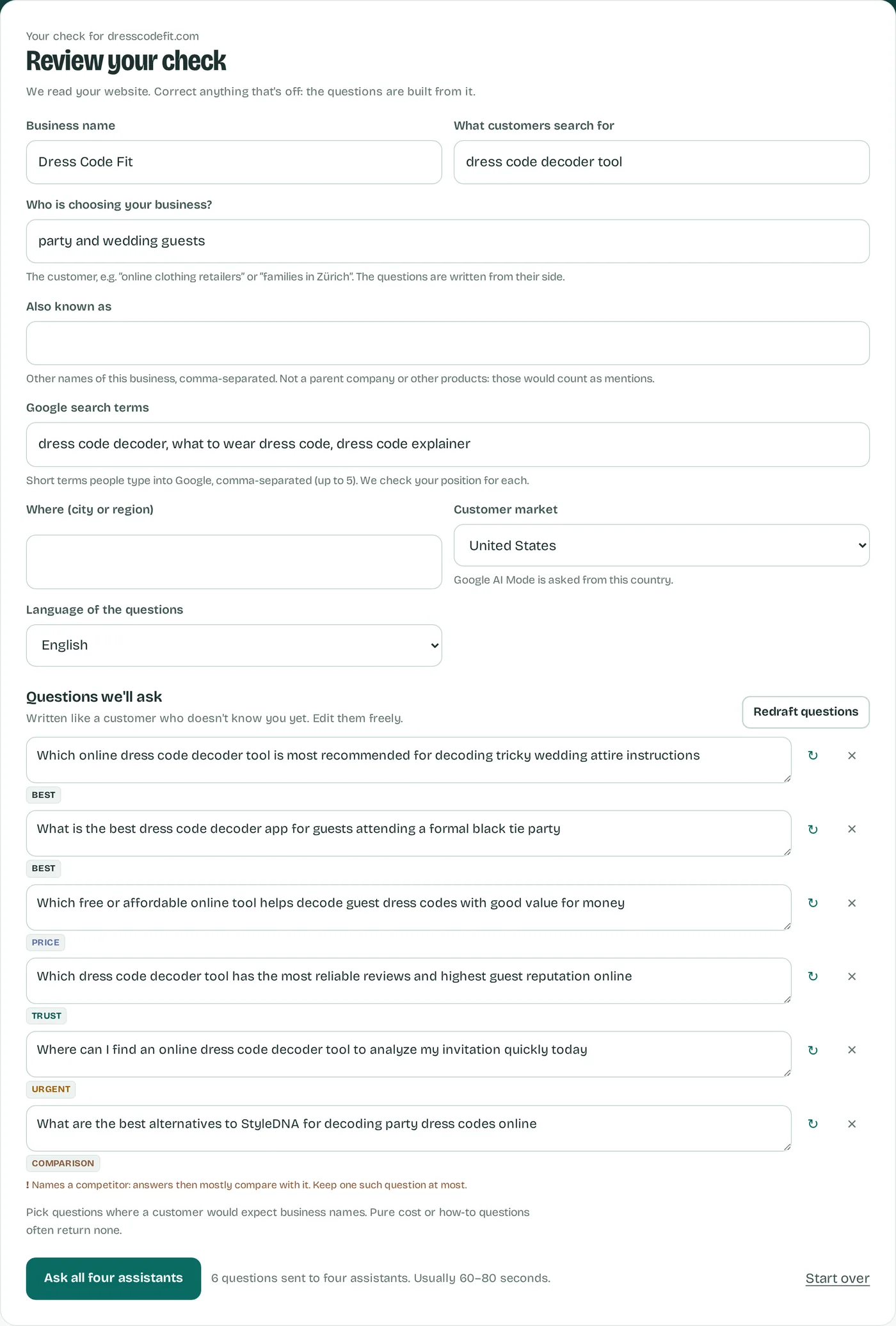
Each question then goes to the consumer versions of ChatGPT, Google AI Mode, Gemini and Microsoft Copilot, logged out, which makes 24 requests, usually completed in about 60 to 80 seconds. Missing answers are shown and excluded from the count. A language model reads every answer and lists the businesses named, in order, so you get the same columns as in the manual table: named or not, position, who else, and which websites were cited. The full text of every answer stays available, so you can read the sentence around your name.
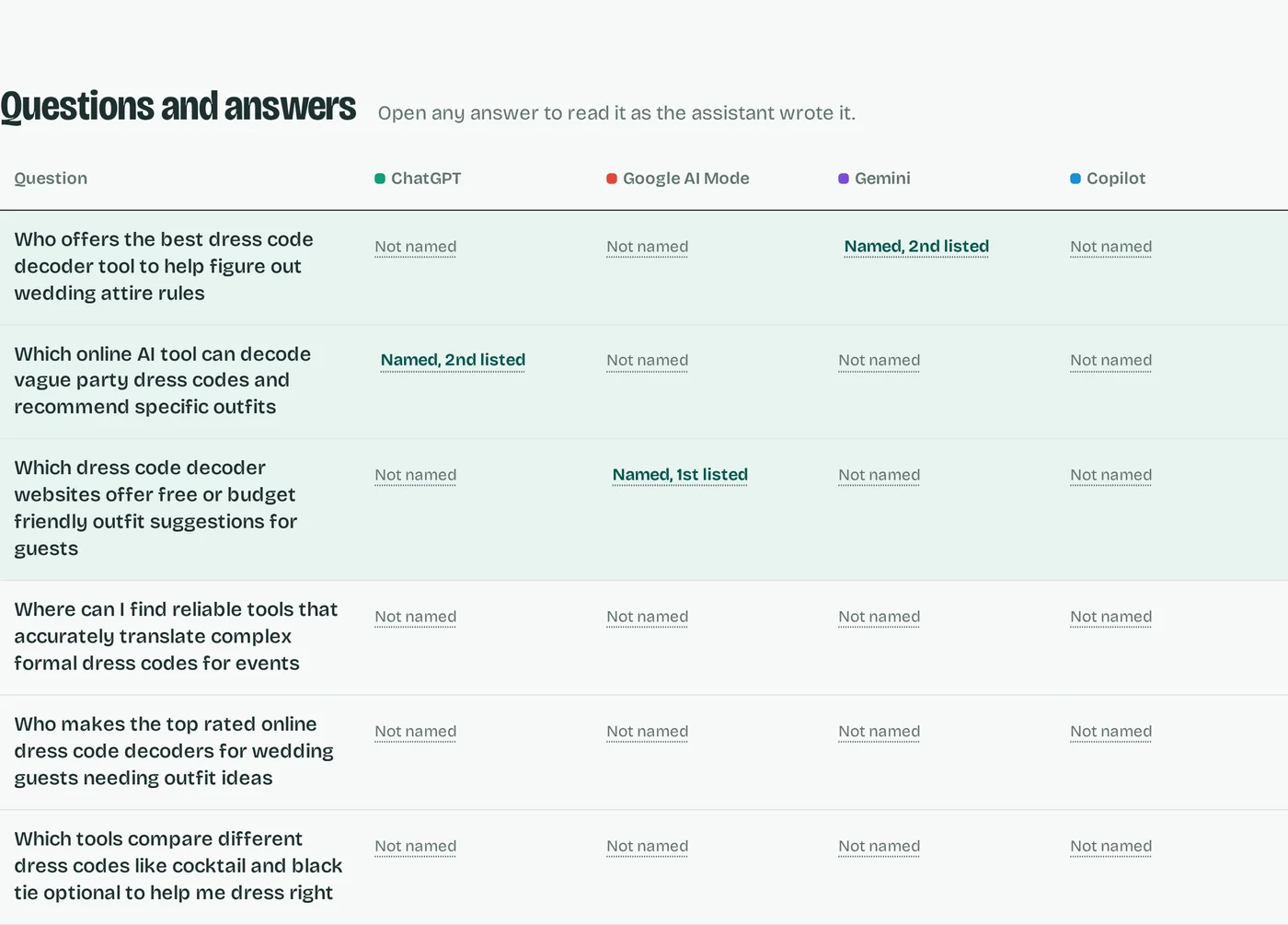
To help distinguish a snapshot from a trend, the report shows a likely range next to the count, and tracking asks the same questions every week or two so you can compare the results over time. The details are on how we measure. CheckAI does not change your website or promise that you will be named; it shows what the assistants answered.
A first check on ChatGPT and Google AI Mode is free and needs no sign-up; the Single Check and the plans ask all four assistants. If you prefer to keep doing it by hand, the steps and the table above are all you need.